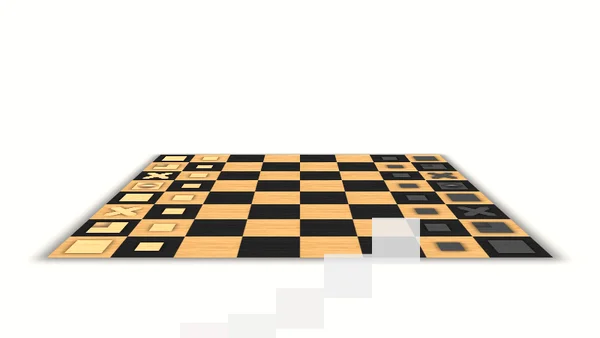
3D Chess
- Genre: Board — Chess
- Objective: 3D Chess brings the world's most celebrated strategy board game into a three-dimensional visual presentation, allowing you to play classic c…
- Play Style: Turn-based tactics and long-term planning
- Difficulty: Medium
3D Chess brings the world's most celebrated strategy board game into a three-dimensional visual presentation, allowing you to play classic chess rules on a board rendered with depth and perspective.
Chess is the definitive strategy game — 1,500 years of competitive play across civilizations and cultures have produced a game of staggering strategic depth from a ruleset of elegant simplicity. Every piece type moves uniquely; the interaction of these different movement patterns creates an effectively infinite variety of positions.
The 3D presentation rotates the board view to allow inspection from different angles, helping players visualize the board from the perspective of both sides — particularly useful for spotting threats and opportunities on the opponent's side of the board.
Key Features:
- Multiple levels and stages
- Multiplayer support
- 3D visual presentation
- Classic retro-inspired design
- Strategic depth and planning
- Full mobile touch support
- Instant browser play — no download needed
- Free to play on desktop and mobile
Getting Started:
3D Chess follows standard international chess rules:
- Piece Setup — The board starts with pieces in their traditional positions. White pieces occupy rows 1–2; black pieces occupy rows 7–8. White always moves first.
- Select a Piece — Click or tap a piece you want to move. Valid destination squares are highlighted.
- Move the Piece — Click or tap the destination square. The piece moves to that square.
- Piece Movement Rules:
- Special Moves: Castling (King and Rook), en passant (pawn capture), pawn promotion (pawn reaching the far rank becomes any piece)
- Check and Checkmate: Put the opponent's King in check (under attack) and prevent its escape (checkmate) to win.
- Draw Conditions: Stalemate (no legal moves but not in check), threefold repetition, fifty-move rule, insufficient material.
- Learn the controls before attempting difficult levels.
- Focus on the objective shown at the start of each round.
- Practice early levels to build confident muscle memory.
Desktop Controls:
- Left-click a piece — selects it (highlighted valid moves appear)
- Left-click a valid destination — moves the piece to that square
- Right-click or click elsewhere — deselects without moving
- Click-drag the board — rotates the 3D viewing angle (where supported)
- Scroll wheel — zoom in/out on the board
Mobile Controls:
- Tap a piece — selects it
- Tap a destination — moves the piece
- Two-finger drag — rotates the board view
- Pinch — zoom control
Pro Tip: AI Difficulty Selection: - Select AI difficulty before starting: Easy for beginners learning piece movement; Medium for intermediate players; Hard for experienced players seeking a challenge - Starting at Easy and increasing difficulty as you win more consistently is the best learning progression
Tips for Beginners:
- Chess strategy is the deepest topic in gaming.
- Opening Principles: - Control the center early: place pawns on e4/d4 (as white) or e5/d5 (as black) in the first moves - Develop pieces toward the center: knights before bishops; bishops before queen and rooks - Castle early to protect the king and connect your rooks - Do not move the same piece twice in the opening unless forced
Advanced Strategies:
- Tactical Patterns: - Fork: A single piece attacking two opponent pieces simultaneously (knights are best for forks) - Pin: A piece attacking a valuable piece through a less valuable piece — the front piece "cannot" move without exposing the valuable piece behind it - Skewer: An attacking piece targeting a high-value piece that, when it moves, exposes a lower-value piece behind it - Discovered Attack: Moving one piece to reveal an attack by a piece behind it
- Strategic Thinking: - Piece activity: an active piece controls many squares; a passive piece controls few — maximize your pieces' activity - Pawn structure: doubled pawns (two pawns on the same file) are weak; passed pawns (no enemy pawn can block them) are strong - King safety: always consider whether your king is exposed to attacks before making any move
High-Score Tip: Decision Process: - Before every move: check if your intended move allows the opponent to capture a piece, puts your king in danger, or misses an opportunity to capture an opponent's piece - Look at the whole board, not just the area of action — threats often come from unexpected directions
Why Play 3D Chess on Fantasy Game?
More Board Games
Ludo Multiplayer
Ludo Board Game
Quick Dice

Jacks or Better

Slot Machine

Lucky Slots

Run Into Death