Flexbox Froggy
- Genre: Educational — Coding
- Objective: Flexbox Froggy is a unique educational game that teaches CSS Flexbox layout through an interactive puzzle format.
- Play Style: Interactive learning through play
- Difficulty: Hard
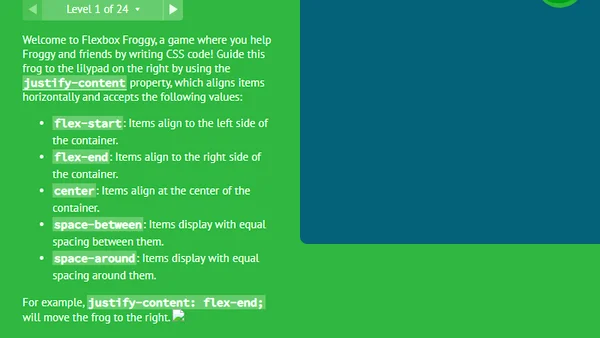
Flexbox Froggy is a unique educational game that teaches CSS Flexbox layout through an interactive puzzle format. In each level, you must write CSS Flexbox code to position a frog (or multiple frogs) correctly on lily pads in the pond.
CSS Flexbox is one of the most important and widely-used layout systems in modern web development. Understanding it is essential for anyone building websites or web applications. Flexbox Froggy makes learning Flexbox dramatically more engaging than reading documentation by providing immediate, visual feedback on every code input.
The game progresses through 24 levels of increasing complexity, starting with basic concepts (justify-content, align-items) and advancing to multi-frog scenarios requiring combinations of Flexbox properties. By the final levels, players have encountered and practiced every major Flexbox property in meaningful context.
Key Features:
- Multiple levels and stages
- Instant browser play — no download needed
- Free to play on desktop and mobile
Getting Started:
Flexbox Froggy teaches CSS Flexbox through 24 progressive puzzle levels:
- See the Puzzle — Each level shows frogs on a pond with lily pad targets. The goal is to position each frog on its matching lily pad.
- Read the Code Editor — A CSS code editor is shown with the current Flexbox properties for the pond container. You must complete or modify the CSS to position the frogs correctly.
- Write the CSS — Type valid CSS Flexbox property values into the editor. The most common properties you will use:
- See the Result — Frogs animate to positions based on your CSS values. If correctly positioned on lily pads, the level is complete.
- Advance — Successfully completing each level unlocks the next, increasingly complex puzzle.
- Retry if Wrong — Incorrect positioning shows where frogs actually land versus where they should be. Adjust the CSS values and retry.
- Learning Value: Each level isolates a specific Flexbox concept, building from simpler to more complex in a pedagogically sound progression.
Desktop Controls:
- Click the code editor — positions cursor for text input
- Type CSS values — enter Flexbox property values
- Backspace / Delete — remove characters
- Tab — indent code (standard coding convention)
- Enter — new line in code
- Click Submit or press Enter — in some versions, applies the code
Mobile Controls:
- Tap buttons — Primary actions
- Swipe gestures — Movement and navigation
Pro Tip: - The property name is typically provided; you complete the value - Example: justify-content followed by your chosen value such as center or flex-end - CSS values are case-sensitive in some contexts — use lowercase
Tips for Beginners:
- Flexbox Froggy learning efficiency improves with focused study of each Flexbox axis.
- The Two-Axis Framework: - Flexbox operates on two axes: the main axis (direction of flex flow) and the cross axis (perpendicular to main).
Advanced Strategies:
- Imagine the frogs as boxes in a row. justify-content pushes them along the row; align-items positions them within the pond height. When the row becomes a column, these operations rotate 90 degrees.
Mistakes to Avoid
- Applying align-items when you need justify-content (confusing which axis you are targeting)
- Forgetting that flex-direction column swaps the axes of justify-content and align-items
- Not accounting for flex-wrap when items overflow the container
High-Score Tip: Real-World Application: - After completing the game, immediately try applying Flexbox to a real web layout.
Flexbox Froggy is the perfect way to master CSS layouts. Take your time to truly understand the difference between justify-content and align-items. If you get stuck on a level, experiment by typing different values and immediately observing how the frogs react—this visual feedback is the core learning mechanism. Remember that flex-direction changes the main axis, which flips how the alignment properties behave. By the time you reach the final levels, you will have a rock-solid understanding of modern web design layouts to use in real-world projects.Why Play Flexbox Froggy on Fantasy Game?
More Educational Games
Crossword for Kids

Kids True Color

Jacks or Better

Slot Machine

Lucky Slots

Run Into Death

Penalty Kick